
Restaurant lost and found software so the host can answer a guest who left a phone.
vFound Lost & Found is lost and found software for restaurants and bars. The host logs a phone, wallet or jacket with one photo, diners find it on your page before they call, and your team decides who gets it back. It costs US$75/month per site, billed yearly at US$900.
Restaurant lost and found software from vFound gives the host one photographed record of what diners leave behind. That is usually a phone, a wallet, a bag or a jacket, so the day shift can answer a guest who calls at noon. The guest may already have found the item on your page, and your team decides who gets it back.
14-day free trial we set up with you, then yearly by invoice.
Reviewed
Picture your guest website.
Try your name and colours. Watch it become yours.
Illustrative preview. Your web address is confirmed during setup.
See the whole lost and found journey in one short film.
See everything in vFound Lost & FoundHow it works at a restaurant
Illustration with sample data.
A phone left in the booth
Found at the host stand
Bussers find the phone in the booth, the jacket on the chair and the keys by the bar once the last table has gone. If the closer logs each one with a photo before leaving, the day shift can answer a guest who calls at noon. The record is already in the shared workspace.
- 1Log
One photo on any phone
Snap a photo and vFound AI suggests the title, category, colour, a brand it can read on the item and a description, ready to check and save. Add where it was found and where it is kept.
- 2Share
The day shift sees it
The item appears in the shared workspace, so nobody needs a binder behind the host stand or a group chat of photos.
- 3Return
Record who collected it
Every return is recorded with a name and a timestamp, and with the guest's signature if you ask for one.
Guests look before they call
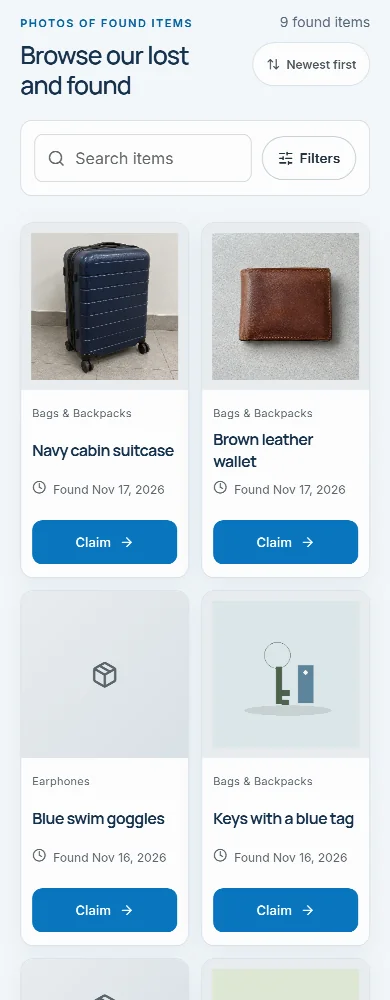
A guest who left a phone can scan the QR sign by the door or follow the link on your website. They search by words or with a photo of what they lost, and they can filter by category and sort by newest first. They may find the phone before the host has picked up a call.
Read more
If nothing matches yet, they describe the loss in their own words, vFound AI asks a few short questions, and they check and send the report. A standing watch then emails them each time a likely match is logged, for 90 days.
- Your page comes in nineteen languages, chosen from the guest's browser or picked by the guest.
- For items logged with photo auto-fill, vFound AI writes search words in Spanish, French, German, Dutch, Italian and Arabic as well as English. Messages in another language are translated for your team.
- Likely matches come back ranked with a one-line reason each, and vFound AI drafts replies for staff to edit and send.
- When a guest calls anyway, staff send the link instead of asking twenty questions.
A claim is checked before a wallet leaves
“I think that’s mine.”
Brown leather wallet · host stand
- Guest submits a claim
- Your team verifies ownership
- Return arranged and recorded
With only a handful of items a week, the risk is not volume but releasing the wrong item to a confident stranger. A wallet or phone is therefore listed with its photo kept private, and ownership is checked against the contents or the lock screen before release. The guest recognizes their own jacket instantly, while your staff check private details instead of going by feel.
Read more
When photo auto-fill reads a photo showing a bank card, an ID or a lit screen, vFound AI's privacy guard switches that photo to staff-only. The item stays listed. The claim check compares a guest's answers and proof photos with your private record and flags answers copied from the public listing. vFound AI suggests, and your team decides.
One café or a restaurant group
A clear next step.
A café or restaurant runs as one site with its own branded guest page and inventory, so claims land with the right team. A group with several sites uses vFound Enterprise, where each branch can run as its own site. One line of code adds the lost and found to your own website, as an embedded page or a floating button. vFound includes photos, vFound AI and unlimited items, team members and storage.
Check the fit for your restaurant
Read more
| Your requirement | Fit | What to check |
|---|---|---|
| Hardware for the lost and found | Not needed | Any phone with a browser logs an item. There is no per-seat licence. |
| One café or a group | Yes | The same workflow runs for a single site, priced per site; a restaurant group with several sites uses vFound Enterprise. |
| Keeping a photo off the public page | Yes | Staff choose whether an item's photo is shown on your guest page. |
| The guest's signature at return | Optional | Switch on Signature at pickup in Settings and guests sign on your phone or tablet. |
| A link to reservations or your till | No | vFound does not read restaurant reservation or point-of-sale records. |
Run a closing shift with sample items
In the 14-day trial we set up with you, log the day's finds from one phone and print the QR sign for the door. Then claim an item as a guest.
How vFound Lost & Found works
From the shelf to its owner in three steps.
- 1
Photograph it. vFound AI writes it up.
AI drafts the details for your team to check. Its privacy guard checks that photo; staff review every photo before publishing.
- 2
Guests find it themselves.
Your branded website lets guests browse photos in nineteen languages. AI adds search keywords in seven languages to photo-filled listings and suggests likely matches.
- 3
Verify privately. Log every return.
Claimants answer details only the owner would know. Your team checks, books the pickup or ships it, and every return is logged.
Everything a lost and found desk needs.
- QR signs and labelsA sign for the desk, a label for every bin and item.
- Lost reports that keep watchingGuests describe a loss once and hear when a match comes in.
- Pickups and shippingGuests book a pickup time or add a delivery address.
- A log of who held each itemBins, approvals, signatures and disposal certificates.
- Nineteen languagesGuest pages, emails and claim messages translated.
- Reports and insightsReturns, busy spots and a weekly summary by email.
See everything in vFound Lost & Found
Photograph found items, publish them on your own guest website and return them to their owners.
Its own page has the film, the use cases, each screen and the answers to common questions.
See everything in vFound Lost & FoundFit and limits
- Who it is for
- Restaurants and cafés that keep the few things diners leave behind, such as phones, wallets, bags and jackets.
- Price
- US$75/month per site, billed yearly at US$900. 14-day free trial we set up with you, then yearly by invoice.
- What it replaces
- A paper logbook, a spreadsheet or a drawer of found items, with a photographed, searchable record.
- What it does not do
- It takes no payments from guests. If an item goes by courier, your team arranges it and records the tracking in vFound.
- vFound AI suggests matches and checks claims, but a person on your team decides every return.
- Only with vFound Enterprise
- More than one site, single sign-on, two-step sign-in, deployment in your own country and guest SMS and WhatsApp alerts are only available with vFound Enterprise, which is scoped and priced for your organisation. What Enterprise includes
Key facts
| Price for one site | US$75/month per site, billed yearly at US$900. Prices in EUR, GBP, CAD and AUD |
|---|---|
| What is included |
|
| Limits | No limit on records, team members or storage. Other limits: up to 6 photos per found item, 500 storage bins, 2,000 rows per found-item CSV import, 100 emailed-in photos a day, 10 API keys and 25 webhook addresses. |
| Languages | Guests see pages and emails in 19 languages: English, Spanish, French, German, Dutch, Italian, Portuguese, Polish, Swedish, Turkish, Japanese, Simplified Chinese, Arabic, Korean, Hindi, Russian, Vietnamese, Indonesian and Thai. The staff workspace is in English, Spanish, French, German, Dutch, Italian and Arabic. |
| Where data is held | Hosted by OVHcloud in Singapore, with an encrypted copy of backups in Canada. When AI assistance is on, vFound AI reads the photo or text in Australia. Deployment in your own country comes with vFound Enterprise. |
| How to start | 14-day free trial we set up with you, then yearly by invoice. Request a trial |
Facts from the field
Figures and rules published by operators, regulators and industry bodies, each linked to its source.
- Florida law says theme parks, zoos, museums, aquariums, restaurants and hotels must record the date each lost item was found, and may donate or dispose of, but not sell, what stays unclaimed after 30 days. The Florida Senate
- Metrocentre in Gateshead tells shoppers that its stores and restaurants also keep their own lost property. Metrocentre
One workspace for everything your desk looks after.
Frequently asked questions
Is this overkill for a single restaurant?+
No. vFound Lost & Found has one flat price per site: US$75/month, billed yearly at US$900, with photos, vFound AI and unlimited items, team members and storage. Every site starts with a 14-day free trial we set up with you.
How do guests know to check the page?+
Put a printable QR sign by the door or host stand, and add the link to your Google Business profile and website footer. When guests call anyway, staff send the link instead of playing twenty questions. The page works in nineteen languages, chosen from the guest’s browser or picked by the guest.
What about wallets, cards and phones?+
List them with the photo kept private. The listing says a wallet was found, and the claimant proves it’s theirs by describing the contents. When photo auto-fill reads a photo that shows a bank card, an ID or a lit screen, vFound AI’s privacy guard switches that photo to staff-only, while the item itself stays listed.
Can a restaurant group run multiple sites?+
Yes, with vFound Enterprise: a one-site account is one site. With Enterprise each branch can run as its own site, with its own guest page and inventory, so a claim about the downtown branch never lands at the airport branch. Network settings show aggregate workload and policy differences across sites, with regional access for the right team members. More than one site is part of vFound Enterprise.
Do staff need training?+
Very little: if they can post a photo, they can log an item, and vFound AI fills in the details for them to check. Walk through it in a pre-shift briefing. Item changes and claim decisions carry the name of the person who made them, so managers can see the system being used correctly.
How does vFound AI help a small restaurant team?+
It takes the writing off your staff. One photo becomes a suggested title, category, colour and description; guests can report a loss in their own words and see likely matches; messages in another language are translated; and replies start from an AI draft. Your team checks each suggestion and makes every decision.
Does vFound AI decide who gets a phone back?+
No. vFound AI compares a claim’s answers and proof photos with your private record and gives staff a suggestion, red flags and a question to ask next. It never changes a claim or an item on its own and never identifies people from images. A person on your team decides each claim, and you can switch AI off in Settings.
Can we keep a wallet's photo off the public page?+
Yes. Staff choose whether each item's photo is shown on your guest page, and ownership is checked against the contents or the lock screen before release.
What should a restaurant look for in a lost and found system?+
Something quick enough for the host stand: one photo to log an item, a page diners can check before they call, a way to keep a wallet's photo private, and a record of who collected it. vFound Lost & Found does this without a binder or a spreadsheet.
Answer the noon call with the photo in front of you.
We set up a 14-day free trial with you and your own team. Keep going and we invoice the yearly price; let it end and nothing is charged.
Request your free trial