
Hospital lost and found software for found items, with a clear boundary.
Hospital lost and found software from vFound gives reception and security a registry for ordinary items found in public areas. It is not a patient property custody system.
Valid card required. Cancel before day 14 to avoid the yearly charge.
Updated
Decide what belongs in this register
Ordinary found items
- An umbrella handed in from the entrance.
- A scarf found in the public cafe.
- A visitor asking about a bag after leaving.
Use your established hospital process
- Property taken into safekeeping at admission or discharge.
- Medicines, clinical records and patient identifiers.
- Anything needing a specialist custody or clinical workflow.
Check the scope with security before a trial
| Your requirement | Fit | What to check |
|---|---|---|
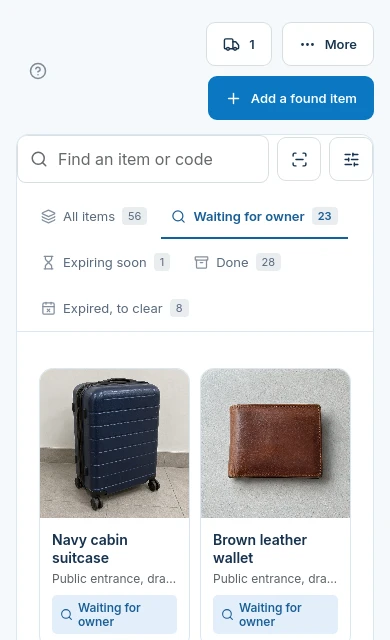
| Found-item photographs and storage notes | Yes | Record an ordinary found item and where the desk keeps it. Check the photo before publishing. |
| Sensitive details shown publicly | No | Do not enter clinical information. Staff can keep an item photo private; this is not a substitute for deciding whether a record belongs here. |
| Patient belongings at admission and discharge | No | vFound does not provide patient property custody. Keep that process in your established hospital system. |
| Electronic patient record connection | No | No patient record connector or clinical workflow is offered by this page. |
An umbrella through the next shift
- Receive
Record what is actually held
Photograph the umbrella at reception and record its storage location. Do not include people or paperwork in the image.
- Enquiry
Ask for identifying details
The visitor can search the venue page or submit a private claim. Staff compare the evidence before approving a return.
- Hand back
Keep the outcome on the record
Record collection after approval. The next shift can distinguish a returned item from one still waiting.
An enquiry is not proof of ownership
The claims queue separates work waiting for a decision from items ready for pickup. vFound AI can suggest a match, but staff decide the claim. A familiar-looking item or a similar description is a reason to check further.

Trial the boundary as well as the screen
Use fictional ordinary items only. Photograph an umbrella, choose its shelf, submit a sample claim and review it as the next shift. Check the public page without signing in. If your intended workflow involves patient belongings or clinical information, this is not the workflow shown here. A 14-day trial requires a valid card.
Questions from hospital found-item desks
Is this a patient property custody system?+
No. This page covers an ordinary found-item registry for hospital reception and security. It does not cover belongings taken into custody at admission, ward transfers or discharge.
Should a hospital enter patient names or medical details here?+
No. Keep clinical information and patient identifiers out of this registry. Use your established hospital process for records that require them.
Can hospital security hide a found item photo?+
Yes. Staff can keep an item photo private. Review the whole record before publishing; a private photo does not make a clinical record suitable for this workflow.
Who decides a hospital visitor's lost property claim?+
Staff decide. vFound AI suggests possible matches and checks claim details, but does not establish ownership or approve a return.
Does the found-item registry connect to an electronic patient record?+
No. This page offers no electronic patient record connection or patient-property workflow.
How should a hospital evaluate this registry?+
Start with fictional umbrellas, scarves and bags from public areas. Check photos, private claim review and hand-back records, then assess fit against your organisation's own requirements. The 14-day trial requires a valid card.
Try the workflow with sample items.
Start your 14-day free trial. A valid card is required; cancel before day 14 to avoid the yearly charge.
Start your 14-day free trial