
Convention centre lost and found software for the show and the day after.
Convention centre lost and found software from vFound gives information desks and security one venue page for attendee enquiries and photographed found items, including after the exhibition has closed.
Valid card required. Cancel before day 14 to avoid the yearly charge.
Updated
Move-out does not end the enquiry
During the show
- Tell attendees where to report a loss.
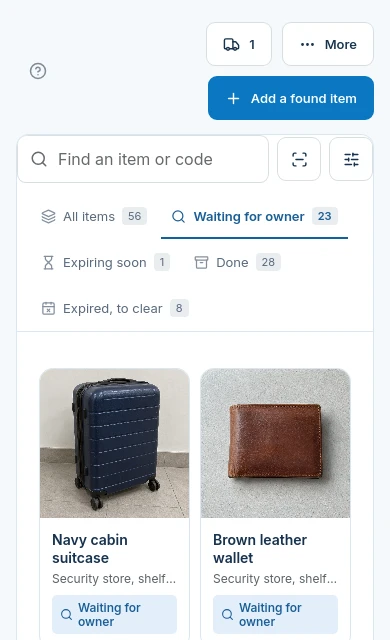
- Photograph ordinary found belongings at the desk.
- Describe the hall and discovery context in the record.
After move-out
- Confirm which storage shelf holds the item.
- Review enquiries arriving after attendees leave.
- Record an approved pickup or staff-arranged postal return.
Work the claim queue between shows
The claim status distinguishes an enquiry awaiting a decision from an item ready for collection. A show badge is context for staff to check, not proof of ownership by itself.

Choose the found-property part of the job
| Your requirement | Fit | What to check |
|---|---|---|
| One public venue page for enquiries | Yes | Attendees search found items or send a lost report from a browser. |
| Hall and show context | Staff recorded | Use descriptive text; no automatic event badge or ticket lookup is implied. |
| Incident dispatch, work orders and exhibitor services | No | This page covers found belongings, not a convention operations suite. |
| Event ticketing integration | No | No event registration or ticketing connector is offered here. |
| Post-show returns | Yes | Staff review claims, arrange the hand-back and record its outcome. Any postage is arranged separately. |
When the paper log stops at closing
A paper log may be enough for a small show, provided the next shift can find it and the stored items. The reason to try a shared register is the handover: a photograph, an enquiry and the physical shelf need to refer to the same object after the organiser has left.
Rehearse a show changeover
Create a fictional exhibition and sample charger. Log where it was found and where it is kept, submit an enquiry after the imagined move-out and hand the record to a second staff member. Check that the venue page remains the right link for the next show. Try 14 days with a valid card.
Questions from convention centre desks
Can an attendee report a loss after a convention closes?+
Yes. The venue page remains the route for a lost report, and the attendee can check possible matches using their private report link.
Does the convention page look up an exhibitor badge?+
No. This workflow has no event ticketing, badge or registration connector. Staff assess the claim details themselves.
How do we distinguish the hall from the storage shelf?+
Describe the hall and show context in the item description. Use the storage location for the shelf where the desk now keeps the object.
Is this convention incident dispatch software?+
No. This page covers found-property records, attendee enquiries and claim review. It does not promise work orders, dispatch or exhibitor service management.
Does an event badge prove a lost-item claim?+
No. Staff should compare identifying details with the item. vFound AI can suggest matches, but staff decide each claim.
What should a convention team test before using the register?+
Use a fictional show and found object, then test logging, a phone enquiry and a handover to the next shift. The 14-day trial requires a valid card.
Try the workflow with sample items.
Start your 14-day free trial. A valid card is required; cancel before day 14 to avoid the yearly charge.
Start your 14-day free trial