
Cruise and ferry lost and found software: keep the enquiry open ashore.
Cruise and ferry lost and found software from vFound connects found-item photos with passenger enquiries after disembarkation. Crew log what they hold; the desk reviews claims and records the return.
Valid card required. Cancel before day 14 to avoid the yearly charge.
Updated
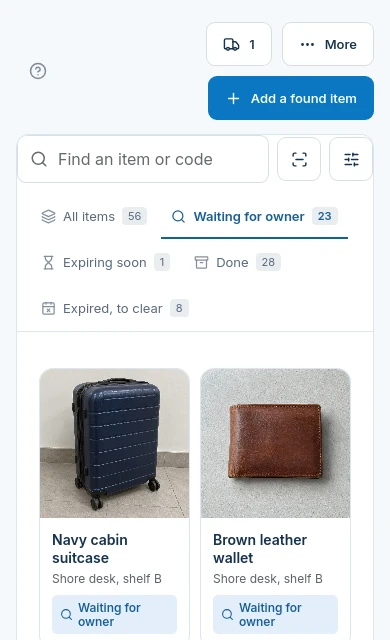
From the lounge to a shore-side enquiry
- On board
Describe the place, not just the ship
In the item description, note the public lounge or seating area where the bag was found. Record the separate storage location where staff can retrieve it.
- After arrival
Keep a route back to the right desk
Link your vessel or terminal venue page from your passenger guidance. A passenger can report a missing item after leaving.
- After review
Agree a return the desk can carry out
Approve the claim only after checking its details. If posting the item, staff choose a carrier, arrange postage separately and record tracking.
A passenger describes the missing bag
A location description can include the sailing and lounge as ordinary text. This does not link the report to a booking or prove that the passenger travelled. Ask for distinguishing details before approving the claim.

Separate found property from voyage operations
| Your requirement | Fit | What to check |
|---|---|---|
| Passenger enquiry after disembarkation | Yes | The venue page and private lost-report link open in the browser. |
| Automatic cabin or booking lookup | No | No cruise booking or passenger manifest connector is offered here. Staff check the claim evidence. |
| Offline capture at sea | No | This is an online browser workflow. Plan a separate process when connectivity is unavailable. |
| Shipping labels and postage purchase | No | Staff arrange any postage outside vFound and record the carrier and tracking number. |
| Several vessel or terminal venues | Enterprise for larger groups | Self-serve covers up to three venues; larger groups need vFound Enterprise. |
Avoid promising that the next port has the bag
Only tell the passenger what the record establishes. A found-item entry is not a scan at every pier, cabin or loading point. Record the physical storage location and confirm possession before arranging collection.
Rehearse an enquiry from home
Use a fictional sailing and a sample bag. Log it at the desk, open the venue page on a phone, fill a lost report and review a claim. Test your separate process for an internet outage. A valid card is required for the 14-day trial.
Questions from cruise and ferry desks
Can a ferry passenger report a loss after reaching home?+
Yes. Share the relevant venue page so the passenger can submit a lost report and check possible matches through their private link.
Does vFound look up a cruise cabin reservation?+
No. This page offers no cruise booking or passenger manifest connector. Staff review the details supplied in the claim.
Will this record baggage scans between ship and pier?+
No. The workflow records found items and their storage location. It is not a baggage routing or loading system.
Can crew use this found-property workflow without internet?+
No. vFound runs online in the browser. Keep a separate procedure for periods without connectivity.
Can the shore team buy postage for a passenger in vFound?+
No. Staff arrange postage separately, then record the carrier and tracking number in the claim return workflow.
Can several ships use one vFound group?+
Self-serve groups cover up to three venues. Larger vessel or terminal groups need vFound Enterprise; decide which venue owns each found-item record before testing.
Try the workflow with sample items.
Start your 14-day free trial. A valid card is required; cancel before day 14 to avoid the yearly charge.
Start your 14-day free trial