
Key sign out log software for an attended key desk.
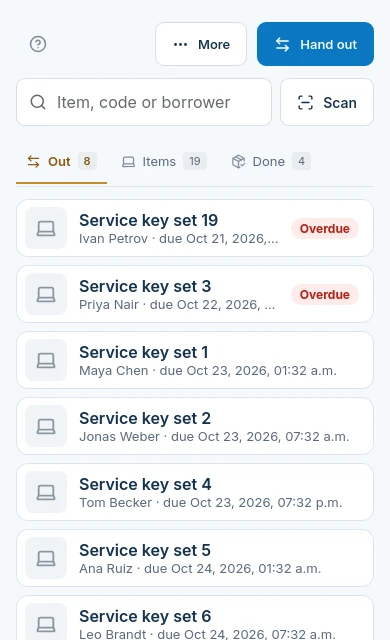
vFound Equipment is key sign out log software for an attended desk. It treats each key or labelled key set as an item, records the person taking it and its due time, and keeps the return on the same checkout.
Valid card required. Cancel before day 14 to avoid the yearly charge.
Updated
Check the physical-security boundary first
| Your requirement | Fit | What to check |
|---|---|---|
| A named holder and due time | Yes | Check out a labelled key or key set to a person in the venue people list. |
| Signature at checkout | Yes | Enable required checkout signatures in venue settings; the checkout then records a signature and emails a receipt. |
| Automatic release from a key cabinet | No | vFound does not unlock cabinets or operate doors. |
| Proof that a returned key still works | No | Staff inspect the physical key. A recorded return is not a lock test. |
| Access rights or key-cutting control | No | The register does not grant door access, prevent copying or replace your physical-security policy. |
At the start and end of a job
- Issue
Use one record for the labelled key set
Scan its label and select the person. Choose a due time that reflects the job rather than leaving an indefinite paper entry.
- Overdue
Follow up with the holder
The desk sees overdue items and can use the existing reminder workflow. A reminder does not recover or disable a missing key.
- Return
Inspect, then record the hand-back
Check the set physically before recording its return. Put it back in your secured storage; the software does not lock it away.
Find the key record before issuing it
A key is an Equipment item. Its label lets staff open the right record, rather than guessing which paper line refers to the key ring. Keep door locations and security-sensitive notes appropriate for your own access policy.

Keep the cabinet procedure alongside the log
A cabinet and a custody log answer different questions. Your cabinet procedure controls physical access. vFound records the checkout, due time and return; it does not confirm who passed through a door or stop someone making a copy.
Try a short job and an overdue return
Use a fictional person and a sample key tag. Check out the set with a signature, confirm the due time and take it back. Review the overdue list with the desk and test your separate missing-key procedure. The 14-day trial requires a valid card.
Questions from key sign-out desks
Does the key sign-out log control an electronic cabinet?+
No. vFound records the key checkout and return. It does not release a cabinet slot or unlock a door.
Can a key set have one checkout record?+
Yes. Record the labelled set as an Equipment item, then check it out to a person with a due time and, when required by your venue, a signature. Staff should inspect the set on return.
What happens when a checked-out key is overdue?+
The desk can see the overdue item and use Equipment reminders. The software does not disable the key or recover it physically.
Does a key return prove the key has not been copied?+
No. A return record shows the recorded hand-back. It does not detect copies, test locks or establish door-access history.
Do key holders need staff workspace accounts?+
No. A person can be a borrower in the venue people list without a staff login. Staff run the attended checkout.
Can a key desk take deposits or missing-key fees in vFound?+
No. Equipment takes no deposits, payments or late fees. Keep any separate charging procedure outside this checkout log.
Try the workflow with sample items.
Start your 14-day free trial. A valid card is required; cancel before day 14 to avoid the yearly charge.
Start your 14-day free trial