
Fire roll call software for visitors: see who is signed in and mark them safe.
vFound Visitors is fire roll call software for the visitors on your site: it lists everyone signed in, adds anyone who signs in while it runs, and lets several team members mark people safe from their own phones.
It covers visitors signed in to vFound. It is not an employee register, so keep your own staff list for drills and evacuations.
Valid card required. Cancel before day 14 to avoid the yearly charge.
Updated
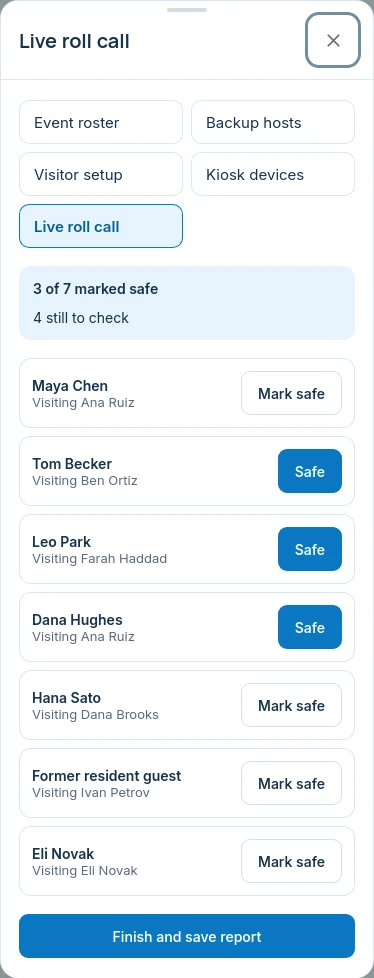
When the alarm sounds, one list on every phone
The person in charge starts a roll call. It lists every visitor who is signed in at that moment and, if you choose, today's expected visitors and anyone waiting in the lobby for approval. Marshals open the same list on their own phones and tap Mark safe beside the people they have found.
Start it
A team member who can make changes in Visitors opens the Live roll call tab and chooses whether to include expected visitors.
Share it
Team members signed in to vFound open the same list on their own phones. It refreshes about every eight seconds, so marks made by other people appear, and anyone who signs in while it runs is added.
Mark people safe
Everyone starts as not marked safe. A tap marks a person safe, and tapping Safe again puts them back, so a mistake is easy to undo.
Finish it
Finish and save report closes the roll call and keeps the report, with who marked each person and when. A roll call left running closes itself after 6 hours so the next one starts fresh.

What a visitor roll call covers, and what it does not
A fire roll call is only as good as the list behind it. This one is the list of people who signed in to vFound, and it says so.
It covers
- Visitors, contractors and drivers signed in to vFound.
- Anyone who signs in after the roll call starts.
- Optionally, visitors expected today and people waiting for approval.
- Several team members marking people safe at the same time.
It does not cover
- Your employees. Keep your own staff list for drills.
- Anyone who never signed in.
- Whether a person has left the building: someone who signs out after it starts stays on the list until marked.
- Alarms, sirens or messages to visitors' phones.
Check the fit for your site
| Your requirement | Fit | What to check |
|---|---|---|
| Several marshals marking people at once | Yes | Team members on their own logins open the same live list and mark people safe. |
| Include visitors who have not arrived | Optional | Tick the option to add visitors expected today and anyone waiting for approval. |
| A practice drill | Same as live | There is no practice mode. A drill is a roll call you start and finish like any other, and its report is saved. |
| Keep working without a connection | No | Each phone refreshes the list from the server and needs a connection. vFound can print the list of who is in the building as a backup. |
| An employee evacuation register | No | Only people signed in as visitors are on the list. Employees stay on your own staff list. |
| Connect to an alarm panel or message visitors | No | vFound does not trigger alarms or contact visitors. Webhooks can tell your own systems when a roll call starts or finishes. |
Run a drill in the 14-day trial
Sign in a few test visitors, start a roll call on two phones, mark some people safe and finish it. Check that both phones agree within a few seconds and read the saved report. Then decide who starts the roll call on your site and who holds a printed list. A valid card is required.
One workspace for everything your desk looks after.
Questions from the marshals
What is a visitor roll call?+
It is a live list of the visitors signed in to vFound, used during a fire drill or evacuation. Team members mark each person safe from their own phones, and the finished report is kept. It covers visitors only; keep your own staff list for employees.
Can several marshals mark people safe at once?+
Yes. Team members on their own logins open the same roll call, and it refreshes about every eight seconds so marks made by other people appear. A mistaken mark is undone by tapping Safe again.
Does the roll call include people who sign in after it starts?+
Yes. Anyone who signs in while the roll call runs is added to the list, and marks already made are kept. A visitor who signs out after it starts stays on the list until someone marks them.
Does the roll call work without a phone signal?+
No. Each phone refreshes the list from the server, so it needs a mobile or Wi-Fi connection. vFound can print the list of who is in the building, which is worth keeping as a backup.
Does vFound sound an alarm or message visitors?+
No. vFound does not connect to alarm panels, sound alarms or send messages to visitors during a roll call. If you subscribe to webhook events, your own systems are told when a roll call starts and finishes.
How long is a roll call report kept?+
The finished roll call stays with the venue's records, showing who was on it, whether each person was marked safe, when, and which team member marked them. Its entries are deleted with the visit once the visit's retention period ends.
Run a drill before you need one.
Start your 14-day free trial. A valid card is required; cancel before day 14 to avoid the yearly charge.
Start your 14-day free trial