
Car rental and parking lost and found software for belongings left behind.
Car rental and parking lost and found software from vFound gives the returns desk a photo record for belongings left in a vehicle, shuttle or parking facility. Staff check claims before handing anything back.
Valid card required. Cancel before day 14 to avoid the yearly charge.
Updated
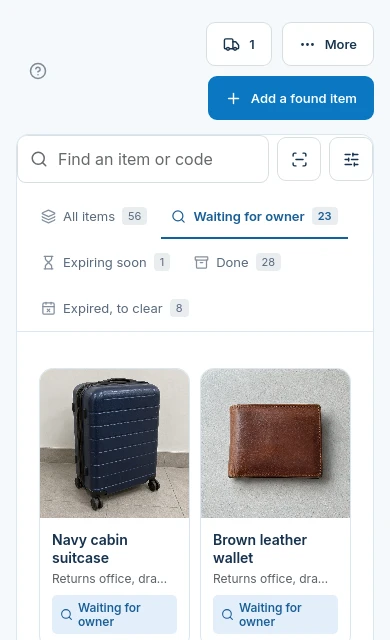
Keep the discovery separate from storage
- Found
Note the return bay or shuttle stop
Put useful discovery context in the description, without copying rental paperwork or payment details.
- Stored
Record the drawer staff can actually search
The storage location is where the found object is kept now, rather than where the vehicle was parked.
- Claimed
Check what only the owner should know
Compare the private claim details with the item. A rental reference supplied by an enquirer is not an automatic verification result.
The driver can enquire after the flight
Give the renter or parking customer the venue page rather than a promise that the item has been found. Reports with no match yet remain distinct from reports that may match an item. Staff review the evidence.

Belongings recovery, not vehicle management
| Your requirement | Fit | What to check |
|---|---|---|
| Photograph and locate found belongings | Yes | Staff record the item and where it is stored for a later shift. |
| Rental agreement or number-plate lookup | No | No rental-system or number-plate recognition connector is offered by this workflow. |
| Barrier, valet dispatch or vehicle tracking | No | vFound does not operate parking hardware or locate a parked car. |
| Return an approved claim by post | Yes, staff arranged | Choose a carrier and record tracking. Buy postage and labels separately. |
| Automatic ownership decisions | No | Staff decide each claim; AI suggestions do not prove ownership. |
Photograph the wallet, not the paperwork
Check photos before making them public. Staff can keep an item photo private. Avoid rental contracts, driving licences, payment cards and other identifying details in a public image.
Try the next-shift handover
Use a fictional return bay and sample belongings. Have one staff member log an item and another find it from the storage note. Submit a sample enquiry from a phone, review the claim and check the separate postage process. The 14-day trial requires a valid card.
Questions from car rental and parking desks
Can a renter report an item after returning the car?+
Yes. Share your venue page so the renter can submit a lost report after leaving. Staff compare the report with the items actually held.
Does vFound connect an item to a rental agreement automatically?+
No. Staff can describe the discovery context, but this page offers no rental agreement connector or automatic renter verification.
Can a parking office use this to find a customer's car?+
No. This is a found-belongings workflow. It does not locate vehicles, read number plates or operate barriers.
Where should the returns desk record the storage drawer?+
Use the item's storage location. Keep discovery context, such as the shuttle stop or return bay, in the description so the next shift can tell the two apart.
Can we publish a wallet without its photo?+
Yes. Staff can keep an item photo private. Review the listing and exclude identifying paperwork before publishing.
Does the rental desk sell return postage through vFound?+
No. Staff arrange any postage and labels separately. The claim return workflow records the selected carrier and tracking number.
Try the workflow with sample items.
Start your 14-day free trial. A valid card is required; cancel before day 14 to avoid the yearly charge.
Start your 14-day free trial