
Museum cloakroom software for coats and bags during a visit.
vFound Checkroom is museum cloakroom software for coats and bags deliberately left at the desk. It gives the visitor a browser ticket and helps staff prepare the right things for collection.
Valid card required. Cancel before day 14 to avoid the yearly charge.
Updated
A visit from entrance to collection
- Arrive
Take in the coat and bag
Record the items and storage number at the staffed desk. A visitor can open their ticket in the browser without installing an app.
- Explore
Keep the ticket accessible
The ticket holds the collection code. Item photographs belong to the staff record, not the visitor ticket.
- Leave
Prepare before the visitor reaches the desk
The visitor asks for their things from the ticket. Staff mark them ready, check the collection code and record the hand-back.
The visitor keeps a ticket on their phone
The request to get things ready helps the desk see what to retrieve next. It is not a reservation for future cloakroom space or a promise that the visitor can open a locker.

A staffed cloakroom, with clear limits
| Your requirement | Fit | What to check |
|---|---|---|
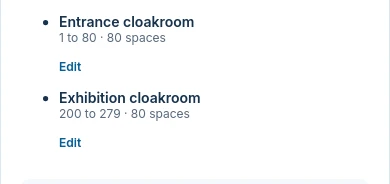
| Numbered storage at separate desks | Yes | Stations have their own number ranges and storage locations. |
| Guest ticket without an app | Yes | The ticket opens in the browser and includes the collection code. |
| Electronic lockers or admission gates | No | vFound does not open lockers or operate museum admission hardware. |
| Cloakroom charges | Recorded, not processed | Staff record a payment taken separately. vFound does not process the guest payment. |
| Museum accession or collections management | No | This is visitor-belongings storage, not a museum collection catalogue. |
A lost ticket and a lost coat are different
If a visitor cannot show the ticket, follow the lost-ticket check rather than returning a coat on its description alone. If the coat was found in a gallery and never checked in, use Lost & Found instead. Keep the two desk procedures clear in visitor guidance.
Test a visit and a closing-time hand-back
Set a fictional museum station and rack range. Take in a sample coat, open its ticket on a phone, request it back and record the hand-back. Review the lost-ticket procedure and any fee recording separately. A valid card is required for the 14-day trial.
Questions from museum cloakrooms
Is museum Checkroom the same as museum Lost & Found?+
No. Checkroom is for belongings deliberately left with staff and tied to a ticket. Lost & Found is for items discovered without an owner present.
Does a museum visitor need to install a cloakroom app?+
No. The visitor ticket opens in the browser and carries the collection code.
Are coat photographs shown on the museum visitor ticket?+
No. Item photos belong to the staff record. The guest ticket holds the number, code and item details.
Can the museum charge for a checked bag through vFound?+
Staff can record payment taken separately. vFound Checkroom does not process the visitor's payment.
Will Checkroom open a museum locker?+
No. The workflow is for an attended desk. It does not control lockers or admission gates.
How should separate museum cloakrooms number their storage?+
Use stations with their own number ranges and storage locations. Test each desk's intake and hand-back with sample coats before using the workflow.
Try the workflow with sample items.
Start your 14-day free trial. A valid card is required; cancel before day 14 to avoid the yearly charge.
Start your 14-day free trial